Title: Collapsing Pages
Author: robfelty
Published: 29.4.2008
Last modified: 1.1.2024
---
Hae lisäosia
This plugin **hasn’t been tested with the latest 3 major releases of WordPress**.
It may no longer be maintained or supported and may have compatibility issues when
used with more recent versions of WordPress.
# Collapsing Pages
[robfelty](https://profiles.wordpress.org/robfelty/)
[Lataa](https://downloads.wordpress.org/plugin/collapsing-pages.2.0.3.zip)
* [Tiedot](https://fi.wordpress.org/plugins/collapsing-pages/#description)
* [Arvostelut](https://fi.wordpress.org/plugins/collapsing-pages/#reviews)
* [Asennus](https://fi.wordpress.org/plugins/collapsing-pages/#installation)
* [Kehitys](https://fi.wordpress.org/plugins/collapsing-pages/#developers)
[Tuki](https://wordpress.org/support/plugin/collapsing-pages/)
## Kuvaus
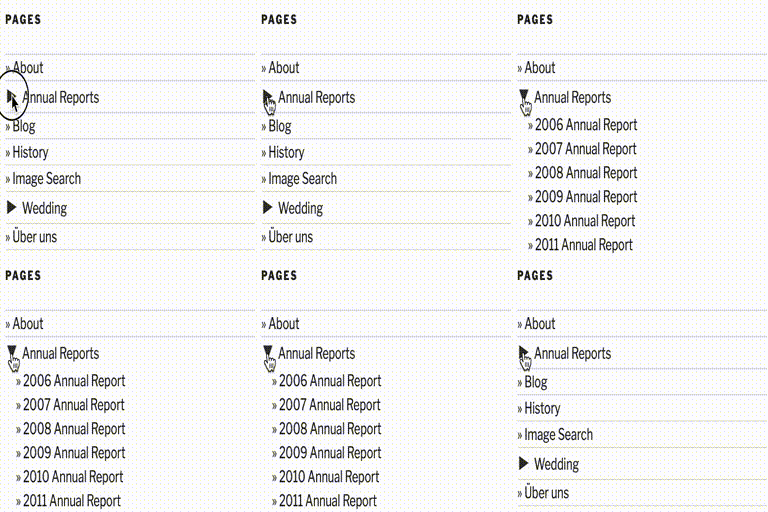
This is a very simple plugin that uses Javascript to form a collapsable set of
links in the sidebar for the pages. Every page corresponding to a given parent page
will be expanded.
It is largely based off of my Collapsing Pages and Collapsing Pages
plugins.
### What’s new?
* 2.0.3 (2024.01.01)
- Fixed issue with subsubpages not closing correctly
- Got rid of some more warnings
- Tested with 6.4.2
* 2.0.2 (2023.12.01)
- Got rid of some warnings
- Updated deprecated property __experimentalGroup
- Tested with 6.4.1
* 2.0.1 (2023.06.16)
- Bug fixes
* 2.0.0 (2023.03.17)
- Updated to use Gutenberg block
* 1.0.1 (2016.05.09)
- Fixed bug where sometimes setting accordion to false broke javascript
* 1.0 (2015.08.12)
- Compatible with WordPress 4.3
- Fixed bug where expanding symbol showed up at lowest depth specified instead
(
thanks to tkibler for pointing it out)
- Added option to only display pages of the current subpage
- Added option to show top-level page (previously it was always shown)
- Added accordion style option
- Cleaned up widget settings
- improved style management, including the ability to specify style per widget
- Switched from unicode symbols to html entities
- Not showing tags for title if empty
- Fixed bug with title attribute of pages
- Totally rewrote javascript
### Options
If using the manual version, you can pass options either as an array, or using
the query style, just like for other wordpress functions such as wp_list_pages
```
$defaults=array(
'title' => __('Pages', 'collapsing-pages'),
'sortOrder'=> 'ASC' ,
'sort'=> 'pageName' ,
'defaultExpand'=> '',
'expand' => 0,
'depth' =>-1,
'inExcludePage' => 'exclude',
'linkToPage' => true,
'inExcludePages' => '',
'showPosts' => false,
'animate' => 0,
'useCookies' => true,
'postTitleLength' => 0,
'showTopLevel' => true,
'currentPageOnly' => false,
'debug' => false,
);
```
* inExcludePage
- Whether to include or exclude certain pages
* ’exclude’ (default)
* ’include’
* inExcludePages
- The pages which should be included or excluded
* showPosts
- Whether or not to include posts as well as pages. Default if false
* linkToPage
- True, clicking on a parent page title will link to that page (default)
- False, clicking on a parent page will expand to show sub-pages
* sort
- How to sort the pages. Possible values:
* ’pageName’ the title of the page (default)
* ’pageId’ the Id of the page
* ’pageSlug’ the url of the page
* ’menuOrder’ custom order specified in the pages settings
* sortOrder
- Whether pages should be sorted in normal or reverse
order. Possible values:
* ’ASC’ normal order (a-z 0-9) (default)
* ’DESC’ reverse order (z-a 9-0)
* expand
- The symbols to be used to mark expanding and collapsing. Possible values:
* ’0’ Triangles (default)
* ’1’ + –
* ’2’ [+] [-]
* ’3’ images (you can upload your own if you wish)
* ’4’ custom symbols
* customExpand
- If you have selected ’4’ for the expand option, this character will be
used
to mark expandable link categories
* customCollapse
- If you have selected ’4’ for the expand option, this character will be
used
to mark collapsible link categories
* postTitleLength
- Truncate post titles to this number of characters (default: 0 = don’t
truncate)
* animate
- When set to true, collapsing and expanding will be animated
* useCookies
- When true, expanding and collapsing of pages is remembered for each
visitor.
When false, pages are always display collapsed (unless explicitly set to auto-
expand). Possible values:
* true (default)
* false
* showTopLevel
- True – show top level pages (default)
- False – only display sub-pages and below
* currentPageOnly
- True – show only parent and sub pages of the current page
- False – show all pages (subject to the include or exclude parameters
set)(
default)
* debug
- When set to true, extra debugging information will be displayed in the
underlying
code of your page (but not visible from the browser). Use this option if you
are having problems
#### Examples
```
collapsPage('animate=true&sort=ASC&expand=3,inExcludePages=about')
```
This will produce a list with:
* animation on * shown in alphabetical order * using
images to mark collapsing and expanding * exclude page about
### Demo
I use this plugin in my blog at http://blog.robfelty.com
### CAVEAT
Currently this plugin relies on Javascript to expand and collapse the links.
If
a user’s browser doesn’t support javascript they won’t see the links to the posts,
but the links to the pages will still work (which is the default behavior in wordpress
anyways)
## Kuvankaappaukset
* [[
* a few expanded pages with default theme, showing nested pages
* [[
* a few expanded pages with default theme, showing drop down version
## Blocks
This plugin provides 1 block.
* Collapsing Pages A Gutenberg block to show a collapsible list of your posts
organized by date
## Asennus
IMPORTANT!
Please deactivate before upgrading, then re-activate the plugin.
MANUAL INSTALLATION
(the only option for pre 2.3 wordpress, unless you have the
widget plugin installed)
Unpackage contents to wp-content/plugins/ so that the files are in
a collapsPage
directory. Now enable the plugin. To use the plugin, change the following where
appropriate (most likely sidebar.php):
```
```
To something of the following:
```
\n";
if( function_exists('collapsPage') ) {
collapsPage();
} else {
wp_list_pages(...);
}
echo "\n";
?>
```
You can specify options if you wish. See the options section.
The above will fall back to the WP function for pages if you disable
the plugin.
WIDGET INSTALLATION
For those who have widget capabilities, (default in WordPress 2.3+), installation
is easier.
Unzip contents to wp-content/plugins/ so that the files are in a
collapsing-pages
directory. You must enable the Collapsing Pages plugin, then simply go the Presentation
> Widgets section and add the Collapsing Pages Widget.
## UKK
### How do I change the style of the collapsing categories lists?
As of version 0.5.3, there are several default styles that come with
collapsing-
categories. You can choose from these in the settings panel, or you can create your
own custom style. A good strategy is to choose a default, then modify it slightly
to your needs.
The following classes are used:
* collapsing – applied to all ul and li elements*
pages – applied to all ul and li elements * list – applied to the top-level ul *
item – applied to each li which has no sub-elements * expand – applied to a page
which can be expanded (is currently collapsed) * collapse – applied to a page which
can be collapsed (is currently expanded) * sym – class for the expanding / collapsing
symbol
An example:
```
```
### How do I make the current page prominent in the list of pages?
The current page has the ”self” class. By default, the ”self” class style is
set
to bold. If you would like to change this, you can change it in the settings page.
## Arvostelut
There are no reviews for this plugin.
## Avustajat & Kehittäjät
“Collapsing Pages” perustuu avoimeen lähdekoodiin. Seuraavat henkilöt ovat osallistuneet
tämän lisäosan kehittämiseen.
Avustajat
* [ robfelty ](https://profiles.wordpress.org/robfelty/)
[Käännä “Collapsing Pages” omalle kielellesi.](https://translate.wordpress.org/projects/wp-plugins/collapsing-pages)
### Oletko kiinnostunut kehitystyöstä?
[Browse the code](https://plugins.trac.wordpress.org/browser/collapsing-pages/),
check out the [SVN repository](https://plugins.svn.wordpress.org/collapsing-pages/),
or subscribe to the [development log](https://plugins.trac.wordpress.org/log/collapsing-pages/)
by [RSS](https://plugins.trac.wordpress.org/log/collapsing-pages/?limit=100&mode=stop_on_copy&format=rss).
## Muutosloki
#### 1.0.1 (2016.05.09)
* Fixed bug where sometimes setting accordion to false broke javascript
#### 1.0 (2015.08.12)
* Compatible with WordPress 4.3
* Fixed bug where expanding symbol showed up at lowest depth specified instead
(
thanks to tkibler for pointing it out)
* Added option to only display pages of the current subpage
* Added option to show top-level page (previously it was always shown)
* Added accordion style option
* Cleaned up widget settings
* improved style management, including the ability to specify style per widget
* Switched from unicode symbols to html entities
* Not showing tags for title if empty
* Fixed bug with title attribute of pages
* Totally rewrote javascript
#### 0.6.1 (2010.06.21)
* Removed extraneous debugging info (subpagecount=)
#### 0.6 (2010.06.18)
* Fixed html validation bug when linkToPage is false (thanks to
levente.csabai)
* fixed html parsing error in widget (thanks to vbonline)’
#### 0.5.3 (2010.01.28)
* Restricted settings page to authorized users
* Fixed bug with manual usage
* Fixed bug with selecting ”show posts as well as pages option”
* Fixed bug with wrong page id assigned to self class
* Switched from scriptaculous to jquery. No longer conflicts with plugins
which
use mootools (e.g. featured content gallery)
#### 0.5.2 (2009.07.19)
* Added advanced options section in configuration
* Added option to remember expanding and collapsing for each visitor
(using cookies)
* Now issuing a correct id for each ul when using widgets
* Small change in manual installation
#### 0.5.1
* Fixed menuorder option
* Fixed problem with multiple instances
* Fixed problems with cookies on page load
#### 0.5.beta
* A few more tweaks
#### 0.5.alpha
* Added option to collapse widget
* Compatible with WP 2.8 (not backwards compatible)
* When using manually, can specify settings directly in code
* Changed hide and show classes to collapse and expand to avoid CSS class
conflicts
* Tweaked default styles
#### 0.4.3 (2009/05/06)
* Fixed html validation error
#### 0.4.2 (2009/04/17)
* Fixed bug with wrong url to images
* Fixed bug with unicode codes showing up on page load instead of triangles
#### 0.4.1 (2009/04/16)
* Added option for custom symbols
#### 0.4 (2009/02/17)
* totally revised and improved style selecting methods
* fixed settings panel issue
* documentation now internationalized (Bernhard Reiter)
* german localization (Bernhard Reiter)
* Added truncate page title option
#### 0.4 (2009/02/17)
* totally revised and improved style selecting methods
* fixed settings panel issue
* documentation now internationalized (Bernhard Reiter)
* german localization (Bernhard Reiter)
* Added truncate page title option
#### 0.3.5 (2009/02/04)
* Updated internationalization support
* Can now exclude and auto-expand using page slug or ID
* Added option to make clicking on parent page expand sub-pages
#### 0.3.4 (2009/01/21)
* removed debugging info
* fixed settings panel
#### 0.3.3 (2009/01/20)
```
* now 'self' class gets attributed to instead of , so it doesn't
apply to all subpages when a parent page is selected
```
* changed ’inline’ to ’block’, which fixes formatting
* If current page is a subpage,
the parent page is automatically expanded in the list
#### 0.3.2 (2009/01/07)
* added version to javascript file
* not loading unnecessary code for admin pages (fixes interference with
akismet
stats page
* ’self’ tag now gets added in subpages
#### 0.3.1 (2009/01/06)
* Finally fixed disappearing widget problem when trying to add to sidebar
* Added debugging option to show the query used and the output
* Moved style option to options page
* tweaked default style some
#### 0.3 (2008.12.04)
* can now use multiple instance of the widget
* can also use manually
* added option to animate expanding
* added more options for expanding characters
* consolidated javascript to share code with other collapsing plugins
* moved inline javascript to footer to speed page load time
* made styling an option (better flexibility and reduce number of http
requests)
#### 0.2.5 (2008.11.01)
* fixed bug in that autoExpand was not available to getSubPage
#### 0.2.4 (2008.10.28)
* fixed bug with missing seventh argument to getSubPage when used recursively
#### 0.2.3 (2008.07.14)
* Added option to automatically expand some pages
* Added option to control the number of levels of pages which are expanded
* Added ”self” class to pages in list which match the current page. No link
is
made for these. CSS can then be used to style these differently
#### 0.2.2 (2008.05.23)
* Re-fixed code so that xhtml validates
* Added option for different expand and collapse icons
#### 0.2.1 (2008.05.01)
* Link now spans the whole dropdown
* Now indicates the presence of an additional submenu (doesn’t work in IE 6
or
less)
* fixed html so that it validates correctly
#### 0.2 (2008.04.30)
* Now includes the possibility of providing a drop-down menu of pages and
sub-
pages, instead of a nested list. Only useful for a header navigation
#### 0.1.1 (2008.04.25)
* Can exclude pages (and sub-pages of those pages)
#### 0.1 (2008.04.23):
```
Initial Release
```
## Metatiedot
* Version **2.0.3**
* Last updated **2 vuotta sitten**
* Active installations **200+**
* WordPress version ** 5.0 or higher **
* Tested up to **6.4.8**
* Language
* [English (US)](https://wordpress.org/plugins/collapsing-pages/)
* Tags
* [menu](https://fi.wordpress.org/plugins/tags/menu/)[navigation](https://fi.wordpress.org/plugins/tags/navigation/)
[pages](https://fi.wordpress.org/plugins/tags/pages/)[sidebar](https://fi.wordpress.org/plugins/tags/sidebar/)
[widget](https://fi.wordpress.org/plugins/tags/widget/)
* [Edistynyt näkymä](https://fi.wordpress.org/plugins/collapsing-pages/advanced/)
## Arvosanat
No reviews have been submitted yet.
[Your review](https://wordpress.org/support/plugin/collapsing-pages/reviews/#new-post)
[See all reviews](https://wordpress.org/support/plugin/collapsing-pages/reviews/)
## Avustajat
* [ robfelty ](https://profiles.wordpress.org/robfelty/)
## Tuki
Onko sinulla jotain sanottavaa? Tarvitsetko apua?
[Tukifoorumi](https://wordpress.org/support/plugin/collapsing-pages/)
## Lahjoita
Haluatko tukea tämän lisäosan kehitystä?
[ Tue tämän lisäosan tekijöitä ](http://robfelty.com/plugins)