

Kuvaus
ShadowScan Security Link gives you ShadowScan Guard local WordPress hardening for plugin auto-updates, username enumeration reduction, version/plugin exposure reduction, sensitive-file blocking, and basic connection/self-check diagnostics.
If you connect the site to ShadowScan Portal, the plugin can also sync heartbeat status and unlock managed features for sites that have an active Essential or Premium plan, or an approved reviewed pricing path. Basic Hosting can stay hosting-only, while ShadowScan Guard local hardening remains available in the plugin until managed entitlements are active.
Pairing the plugin and enabling remote diagnostics each require an explicit administrator acknowledgment in WP Admin. Those checkpoints are covered by the ShadowScan Plugin Addendum.
ShadowScan does not install, activate, or configure third-party security tools. If another security plugin is present, the connector only records its presence as metadata.
External services
This plugin can connect to external services to sync status, process security workflows, and support optional diagnostics after an admin pairs the site to ShadowScan.
- Service: ShadowScan API (hosted at Supabase Edge Functions)
- URL: ShadowScan API
- Used for: site pairing, heartbeat sync, command polling, command-result upload, subscription/policy sync, and support contact submissions.
- Data sent and when: site URL, WordPress version, PHP version, connector version, Guard Layer/control status, heartbeat timestamps, and command execution metadata whenever the connector syncs with ShadowScan; contact form fields only when an admin submits support contact.
- Terms: shadowscan.com.au/terms
- Privacy: shadowscan.com.au/privacy
-
Plugin Addendum: shadowscan.com.au/plugin-addendum
-
Service: Have I Been Pwned Passwords API
- URL: api.pwnedpasswords.com
- Used for: optional breached-password checks in password policy enforcement.
- Data sent and when: k-anonymity password hash prefix (first 5 SHA-1 characters, no raw passwords) only when a password is checked by the policy flow.
- Terms: haveibeenpwned.com/TermsOfUse
-
Privacy: haveibeenpwned.com/Privacy
-
Service: Sentry
- URL: sentry.io
- Used for: optional error and fatal-event telemetry to assist troubleshooting.
- Data sent and when: error event metadata (such as exception messages, stack traces, and runtime context) only after an admin explicitly enables Sentry telemetry in plugin settings and a Sentry DSN is configured; the optional MU diagnostics helper can send early-startup fatal errors only while both Sentry telemetry and remote diagnostics are enabled.
- Terms: sentry.io/terms
- Privacy: sentry.io/privacy
Third-Party Libraries
This plugin bundles:
* pragmarx/google2fa (MIT License)
* bacon/bacon-qr-code (BSD-2-Clause; Copyright (c) 2017-present, Ben Scholzen ”DASPRiD”)
Hooks
shadowscan_log
Fires when the plugin emits an internal log message. You can hook this in a must-use plugin or theme if you want to capture logs.
Kuvankaappaukset
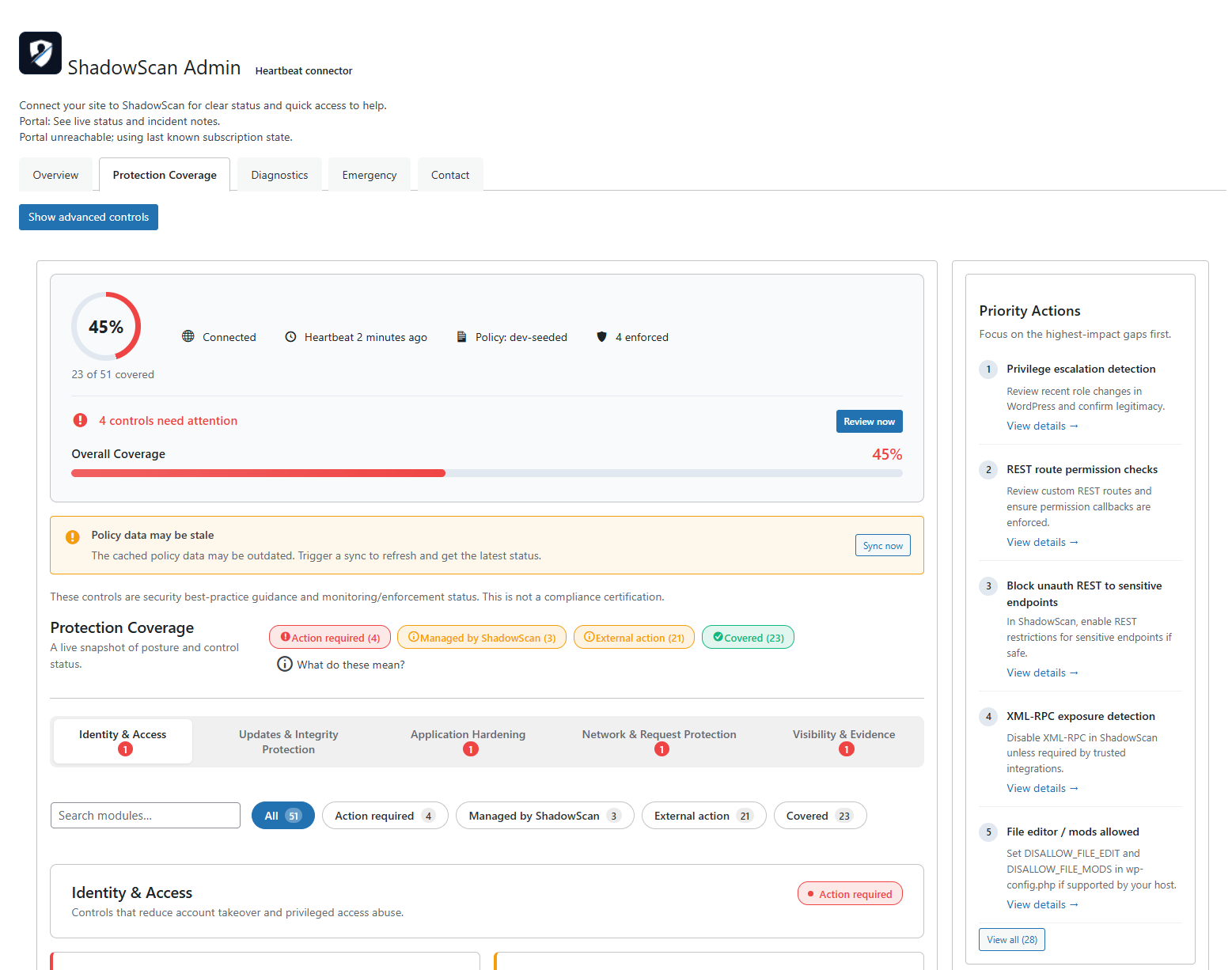
ShadowScan setup dashboard in WordPress admin.
Asennus
- Upload the plugin ZIP in WordPress: Plugins Add New Upload Plugin.
- Activate ”ShadowScan Security Link”.
- Open ShadowScan in WP Admin and follow the setup steps.
UKK
-
Does this plugin require a ShadowScan account?
-
No for the plugin’s ShadowScan Guard local hardening features. Yes if you want to pair the site with ShadowScan Portal or use managed features that require an active Essential or Premium plan, or approved reviewed pricing.
-
Does deactivating the plugin disconnect the site from ShadowScan?
-
By default, no. Deactivation pauses scheduled connector activity, but disconnect is only performed from explicit disconnect/uninstall actions.
-
What data is sent to ShadowScan?
-
When paired, the connector sends basic environment details (site URL, WordPress/PHP versions, plugin version) and heartbeat status so ShadowScan can monitor connection health.
-
Does it send administrator credentials?
-
No. Credentials are never sent by the plugin.
-
Does remote diagnostics install anything on the site?
-
Only after an admin explicitly enables Sentry telemetry and remote diagnostics, and the site has an active Essential or Premium plan, or approved reviewed pricing, ShadowScan can install a temporary must-use helper from the portal to capture early startup errors for troubleshooting. It can be removed from the portal or automatically when telemetry/remote diagnostics are disabled.
-
Which legal terms apply to the plugin?
-
The plugin is covered by the ShadowScan Terms, Privacy Policy, and Plugin Addendum. The Plugin Addendum covers plugin-specific behaviour such as pairing, telemetry, remote diagnostics, and deactivation versus disconnect.
Arvostelut
There are no reviews for this plugin.
Avustajat & Kehittäjät
“ShadowScan Security Link” perustuu avoimeen lähdekoodiin. Seuraavat henkilöt ovat osallistuneet tämän lisäosan kehittämiseen.
Avustajat
Käännä “ShadowScan Security Link” omalle kielellesi.
Oletko kiinnostunut kehitystyöstä?
Browse the code, check out the SVN repository, or subscribe to the development log by RSS.
Muutosloki
1.2.3
- Fixes pairing request to explicitly use POST method, resolving a critical error during site pairing.
1.2.2
- Improves pairing reliability by ensuring pairing requests always use the canonical production API endpoint.
- Improves pairing error messaging with specific codes for expired, invalid, or mismatched pairing codes.
- Adds reset pairing state control so administrators can clear cached tokens and retry pairing without manual database edits.
- Improves coverage UI and filter controls for easier protection management.
- Improves access tier handling for headers and protection features.
- Improves filter panel toggle behavior and accessibility.
1.2.1
- Improves code quality and WordPress.org compliance by fixing input sanitization, replacing discouraged functions with WordPress equivalents, and resolving translator comment issues.
- Updates API endpoint to the current Supabase project URL.
1.2.0
- Improves onboarding and protection coverage visibility so setup steps and actionable items are easier to follow in WordPress admin.
- Improves plan-aware messaging so ShadowScan Guard, Basic Hosting, and managed plan states are clearer after pairing.
- Improves managed feature access so hosting-only, Essential, Premium, and approved reviewed pricing paths align more accurately with the current account state.
- Improves pairing context and legal checkpoints to make account association and administrative acknowledgements clearer.
- Improves portal-connected compatibility and local hardening flows so status sync and guided setup behave more consistently.
1.1.1
- Improves onboarding copy to more accurately reflect available plan options during setup.
- Improves in-plugin messaging so status and connection labels match your active plan type.
- Improves trial and quick-action wording to better reflect self-serve options across all plans.
1.1.0
- Improves subscription visibility so trial, billing, and active protection states are easier to understand in WordPress admin.
- Improves setup guidance and status messaging so getting started with ShadowScan feels clearer and more reassuring.
1.0.12
- Improves portal connection reliability and policy syncing consistency.
- Improves command delivery and signature compatibility so queued actions complete more reliably.
- Improves connector diagnostics and status reporting, including admin geo and plugin auto-update signals.
- Improves evidence export handling and clears stale connector errors after successful syncs.
1.0.11
- Improves plugin package reliability for smoother updates.
- Improves quality checks so releases are more consistent.
- Improves release process stability to reduce update issues.
1.0.10
- Improves privacy controls for diagnostics and telemetry settings.
- Improves account protection flows during profile and sign-in updates.
- Improves compatibility by updating bundled dependencies.
1.0.9
- Improves connection recovery behavior when the portal temporarily rejects requests.
- Improves admin status reporting so connection state is easier to understand.
1.0.8
- Strip non-production vendor scripts/tests from release ZIP for WordPress.org compliance.
- Keep release guard clean after POT generation.
- Document external password breach check service.
1.0.7
- Improve release workflow stability and dependency locking.
- Add MU helper diagnostics commands and admin visibility.
- Harden logging and input sanitization for compliance.
1.0.6
- Improve release pipeline and runtime resilience.
- Strengthen API reliability, event delivery, and enforcement handling.
- Tighten sanitization and filesystem safety checks.
1.0.5
- Same changes as 1.0.6 (superseded by tag v1.0.6).
1.0.4
- Adds Admin Access Guard with location-based protection for wp-login/wp-admin, including observe/enforce modes and emergency bypass.
- Improves plugin safety and recovery behavior (fail-open access, clearer status visibility, safer handling during billing pauses).
- Refines plugin UI and diagnostics to make protection coverage, controls, and troubleshooting easier to understand and use.
1.0.3
- Adds PHP 7.4 compatibility for MFA using Google2FA and Bacon QR.
- Improves admin UI clarity and offboarding/diagnostics handling.
1.0.2
- Adds emergency containment, targeted integrity scans, and server controls.
- Adds operational controls for htaccess, enumeration protections, and security headers.
- Refines third-party security plugin detection and updates tooling/docs.