

Kuvaus
Generate your font glyph in your page with simple shortcode. Showcase your font to your client with hidden glyph
Kuvankaappaukset
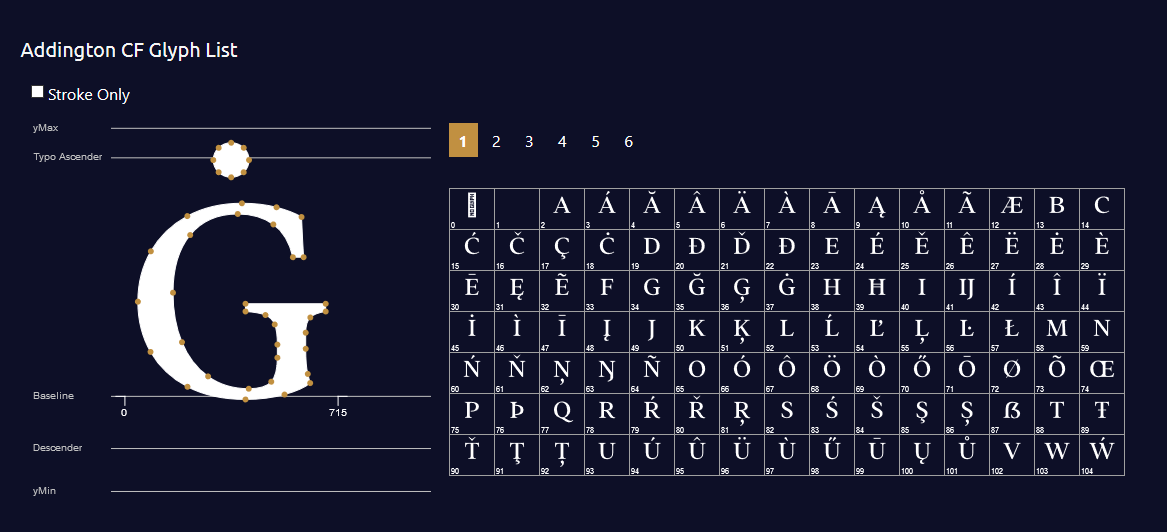

Asennus
- Upload
glyph-generator.zipto the/wp-content/plugins/directory - Activate the plugin through the ’Plugins’ menu in WordPress
- Use [draglyph] shortcode in your page / post / product page.
- Include Options into your shortcode. eg. [draglpyh url=’your-font-url’ glyph=’#000′ stroke=’#red’]
UKK
-
What Attributes that I can use ?
-
- fonturl => Your font url (default : use Roboto-Black)
- fill => Color for glyph and glyph items (default: #000)
- stroke => Color of glyph’s stroke (default: #fff)
- numpage => How many glyph items do you want to show in a page (default : 100)
- upfont => Enable visitor to check their own font (default:1) ~ value: 1 = allow – 0 = false
-
Is it support Woocommerce
-
Just put the shortcode in product description or additional tabs, and it’s ready to action
-
Do you have Demo
-
You can see the plugin in action at https://indras3hat.com/glyph-generator
-
Can I contact you for support ?
-
Yes! you can send your questions to ask@indras3hat.com
Arvostelut
There are no reviews for this plugin.
Avustajat & Kehittäjät
“Glyph Generator” perustuu avoimeen lähdekoodiin. Seuraavat henkilöt ovat osallistuneet tämän lisäosan kehittämiseen.
Avustajat
Käännä “Glyph Generator” omalle kielellesi.
Oletko kiinnostunut kehitystyöstä?
Browse the code, check out the SVN repository, or subscribe to the development log by RSS.