
Kuvaus
IntelliPOS E-commerce Fiscalization connects a WooCommerce store to the IntelliPOS ESIR service and enables fiscalization of orders directly from WordPress administration.
The plugin is intended for merchants in Serbia that use WooCommerce and IntelliPOS for electronic fiscalization.
After connecting an IntelliPOS instance, orders can be fiscalized automatically when they reach a selected WooCommerce status. Fiscalization can also be started manually from the order screen.
Main features
- Automatic fiscalization of WooCommerce orders.
- Manual fiscalization of individual orders.
- Select the WooCommerce order status that triggers fiscalization.
- Full refund of a previously fiscalized receipt.
- Optional automatic IntelliPOS full refund when WooCommerce has fully refunded the order.
- Protection against duplicate fiscalization.
- Protection against duplicate refunds.
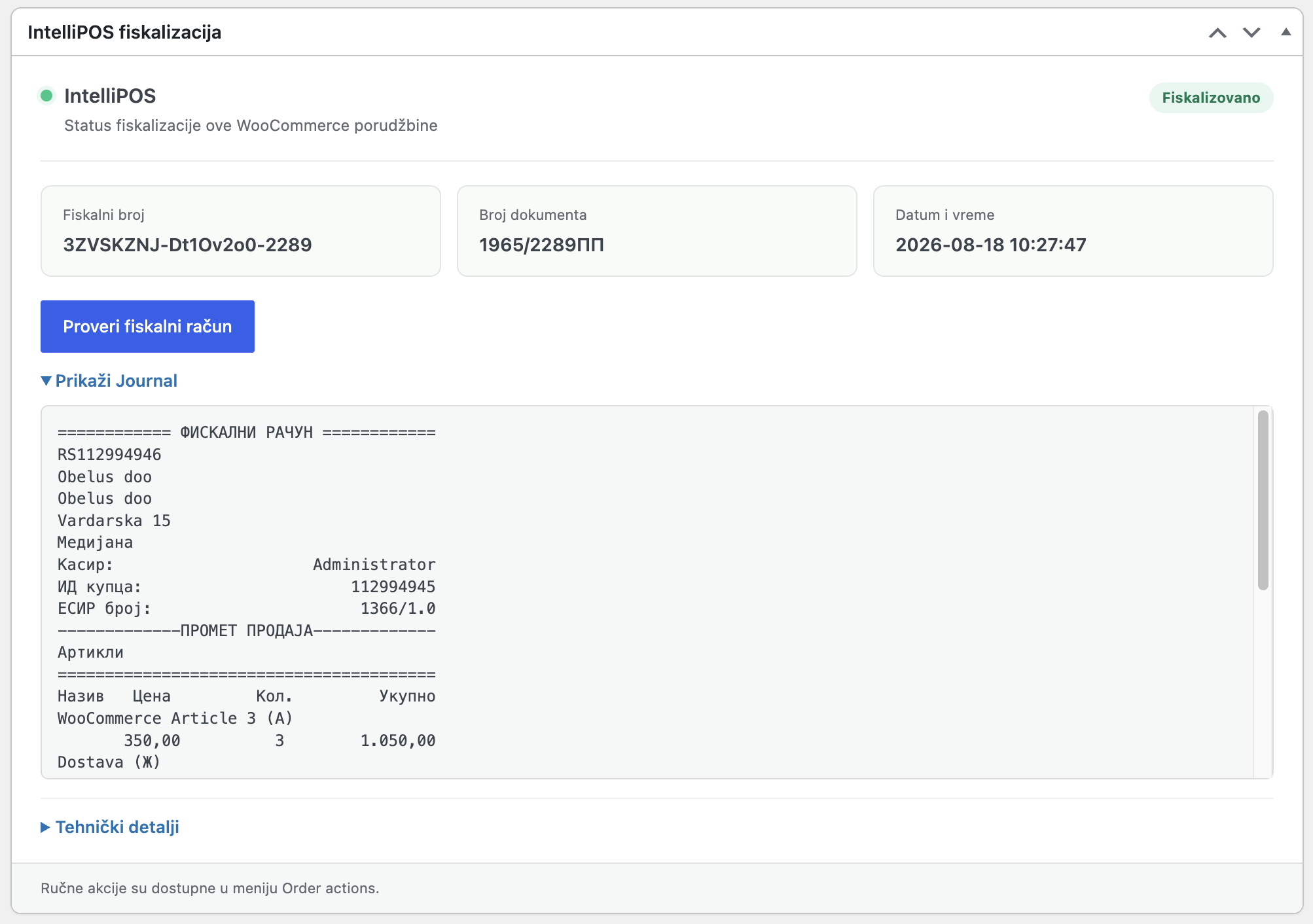
- Fiscal document data stored with the WooCommerce order.
- Status and error history in WooCommerce order notes.
- Support for individuals and companies.
- Company name and Serbian tax ID (PIB) fields for business customers.
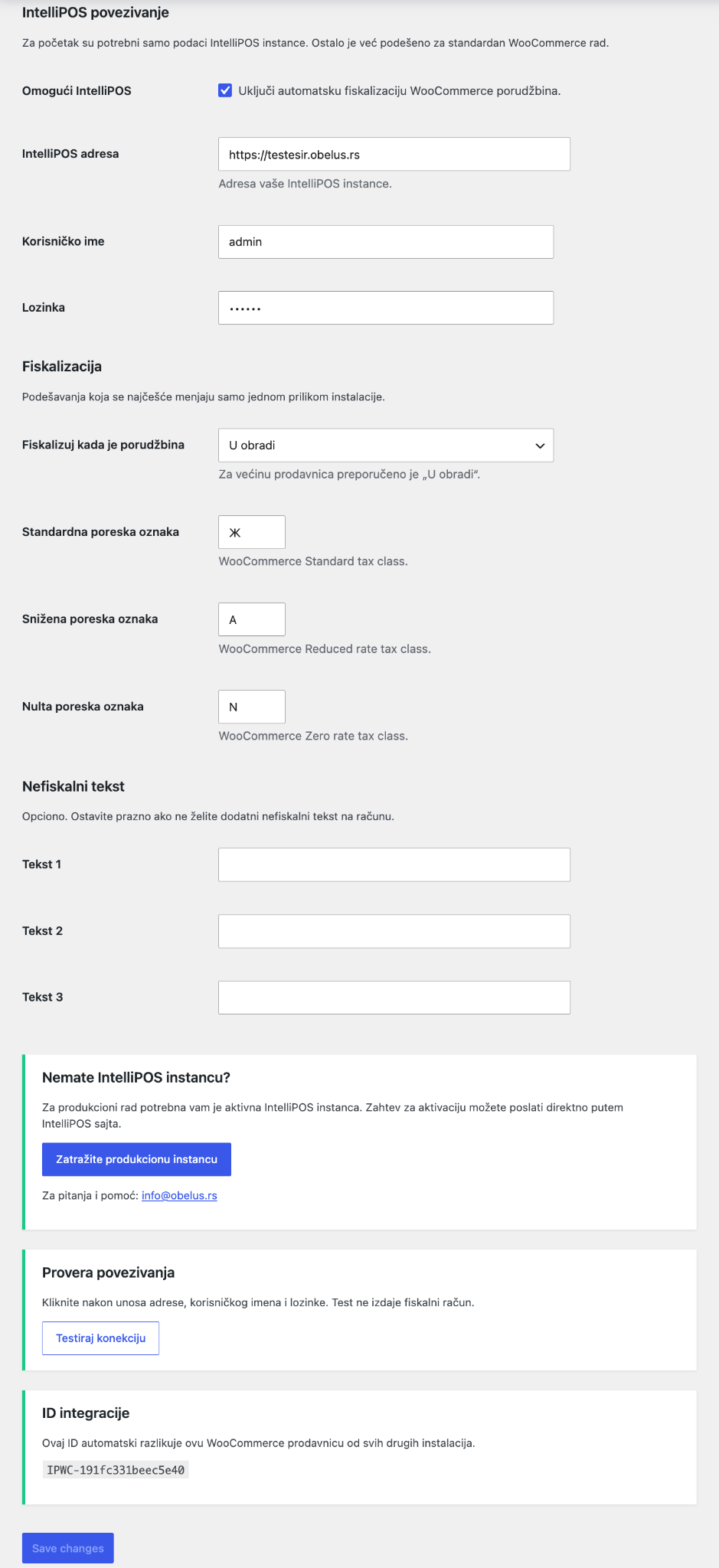
- Tax-label mapping for standard, reduced and zero tax classes.
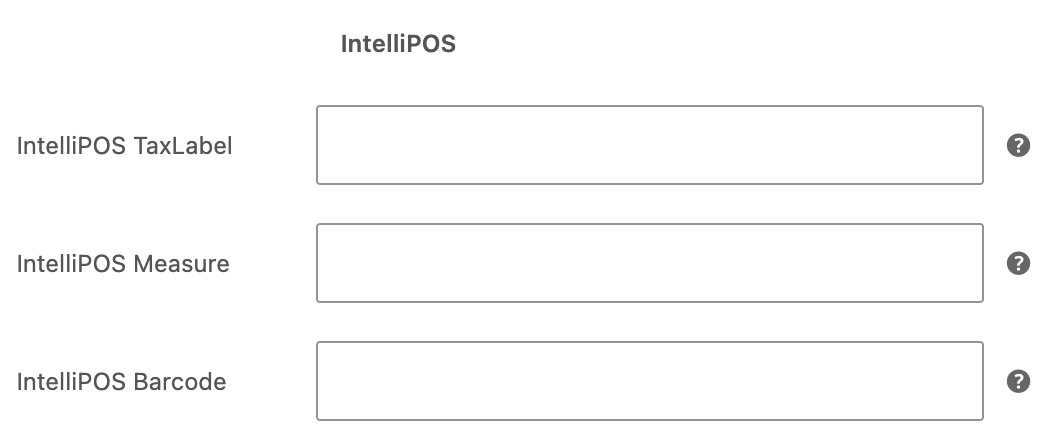
- Optional IntelliPOS tax label, unit of measure and barcode per product.
- Optional non-fiscal text on the receipt.
- Connection test without issuing a fiscal receipt.
- Unique integration ID for each installation.
- WooCommerce High-Performance Order Storage (HPOS) compatibility.
- Support for classic WooCommerce checkout and WooCommerce Checkout Blocks.
How it works
- Install and activate the plugin.
- Open WooCommerce > Settings > IntelliPOS.
- Enter the URL, username and password of your IntelliPOS instance.
- Test the connection.
- Configure tax labels and the order status that triggers automatic fiscalization.
- Enable IntelliPOS.
- New WooCommerce orders are fiscalized through the connected IntelliPOS instance.
Manual fiscalization and full refunds are also available from individual WooCommerce orders.
External IntelliPOS service
This plugin relies on the external IntelliPOS service operated by Obelus for electronic fiscalization. Installing the plugin alone does not contact the IntelliPOS service. Communication starts when the site administrator configures an IntelliPOS instance, tests the connection, or enables fiscalization.
An active and correctly configured IntelliPOS instance is required for fiscalization. The WordPress plugin itself is not an ESIR and cannot issue fiscal receipts independently.
During authentication, the plugin sends the configured username and password only to the IntelliPOS instance entered by the administrator. During fiscalization or refunds, the plugin sends data required to create the fiscal document. This may include order data, products, quantities, prices, taxes, payment method, and relevant customer identification data.
Service information:
https://intellipos.rs/
Privacy Policy:
https://intellipos.rs/politika-privatnosti.html
Terms of Use:
https://intellipos.rs/uslovi-koriscenja.html
Getting a production IntelliPOS instance
If you do not yet have an IntelliPOS instance, you can request activation at:
https://intellipos.rs/aktivacija.html
For questions and support:
info@obelus.rs
Privacy
The plugin does not send data to advertising or analytics services.
When the administrator enables the IntelliPOS integration, data required for fiscalization is sent to the IntelliPOS instance configured by the administrator.
Depending on the order, transmitted data may include:
- order identifier and order number,
- product information,
- quantities and prices,
- tax labels,
- payment method and amount,
- customer identification data when required for fiscalization,
- company name and Serbian tax ID (PIB) for business customers.
The site administrator is responsible for ensuring that the site’s privacy policy describes the processing performed through fiscalization and the IntelliPOS service.
IntelliPOS Privacy Policy:
https://intellipos.rs/politika-privatnosti.html
IntelliPOS Terms of Use:
https://intellipos.rs/uslovi-koriscenja.html
Kuvankaappaukset
Asennus
- Install the plugin from WordPress administration or upload the ZIP package.
- Activate the plugin.
- Make sure WooCommerce is installed and active.
- Open WooCommerce > Settings > IntelliPOS.
- Enter the IntelliPOS instance URL, username and password.
- Save the settings.
- Click ”Test connection”.
- Configure the tax labels that match your IntelliPOS setup.
- Select the WooCommerce order status that should trigger fiscalization.
- Optionally enable automatic fiscal refunds for fully refunded WooCommerce orders.
- Enable IntelliPOS.
We recommend testing with a test IntelliPOS instance or a controlled test order before enabling automatic fiscalization in production.
UKK
-
Does the plugin work without an IntelliPOS account?
-
No. The plugin is a connector between WooCommerce and IntelliPOS. An active IntelliPOS instance is required to issue fiscal receipts.
-
Is fiscalization automatic?
-
Yes. The administrator selects the WooCommerce order status that triggers fiscalization. Manual fiscalization is also available from the order screen.
-
Can the same order be fiscalized twice?
-
The plugin checks whether a fiscal document has already been created and blocks normal duplicate fiscalization attempts.
If a timeout or server error leaves the outcome uncertain, the plugin blocks automatic retries until the administrator checks the result in IntelliPOS.
-
Does the plugin support refunds?
-
Yes. A full refund of a previously fiscalized receipt is supported. The plugin also records refund status and protects against normal duplicate-refund attempts.
Automatic fiscal refunds are optional and can be enabled in WooCommerce > Settings > IntelliPOS. The plugin sends an automatic IntelliPOS refund only when the total WooCommerce refunded amount reaches the full order amount. Partial WooCommerce refunds are recorded in the order notes but are not sent to IntelliPOS because the IntelliPOS refund endpoint refunds the complete original fiscal document.
-
Does the plugin support business customers?
-
Yes. Checkout supports customer type selection. Company name and Serbian tax ID (PIB) can be entered for business customers and are stored with the order when required for fiscalization.
-
How are tax labels determined?
-
IntelliPOS settings allow tax labels to be mapped to WooCommerce standard, reduced and zero tax classes. A tax label can also be configured for an individual product when needed.
-
Is HPOS supported?
-
Yes. The plugin declares compatibility with WooCommerce High-Performance Order Storage.
-
Where can I see the fiscalization result?
-
Fiscalization status and relevant document information are stored with the WooCommerce order. The plugin also adds order notes for successful operations and errors.
Arvostelut
There are no reviews for this plugin.
Avustajat & Kehittäjät
“IntelliPOS E-commerce Fiscalization” perustuu avoimeen lähdekoodiin. Seuraavat henkilöt ovat osallistuneet tämän lisäosan kehittämiseen.
Avustajat
Käännä “IntelliPOS E-commerce Fiscalization” omalle kielellesi.
Oletko kiinnostunut kehitystyöstä?
Browse the code, check out the SVN repository, or subscribe to the development log by RSS.
Muutosloki
1.0.3
- Added optional automatic delivery of the fiscal receipt to the WooCommerce billing email through IntelliPOS
/Document/SendMail. - Added a manual order action to resend the fiscal receipt email.
- Added email delivery status, recipient, send time and error information to the IntelliPOS order panel.
- Email delivery failures no longer affect an already successful fiscalization.
1.0.2
- Added an administrator setting for automatic fiscal refunds after a WooCommerce order becomes fully refunded.
- Partial WooCommerce refunds are recorded in order notes and are not sent to IntelliPOS because the IntelliPOS refund endpoint refunds the complete original fiscal document.
- Added clearer refund-event status to the IntelliPOS order panel.
- Added order notes for disabled, partial, failed, already-refunded and successful WooCommerce refund events.
- Expanded stored refund response metadata for easier troubleshooting.
1.0.1
- Initial public release.
- Automatic and manual fiscalization of WooCommerce orders.
- Full fiscal receipt refund.
- Duplicate fiscalization and duplicate refund protection.
- IntelliPOS tax-label settings.
- Business customer and PIB support.
- WooCommerce Checkout Blocks support.
- HPOS compatibility.
- Unique integration ID per installation.
- Optional non-fiscal receipt text.