

Kuvaus
Select multiple items from the media library and download them as a single ZIP archive. Simple and efficient.
Kuvankaappaukset
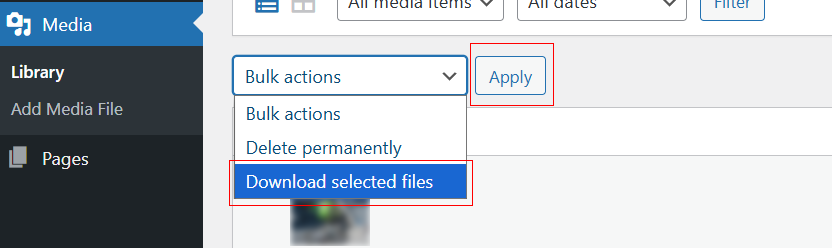
Location of the ”Download selected files” button in the Media Library.
Asennus
- Upload the plugin files to the
/wp-content/plugins/media-library-downloaddirectory, or install through the WordPress plugins screen directly. - Activate the plugin through the ’Plugins’ screen in WordPress.
- Go to Media > Library and use the ”Download selected files” button or bulk action.
Arvostelut
There are no reviews for this plugin.
Avustajat & Kehittäjät
“Media Library Download” perustuu avoimeen lähdekoodiin. Seuraavat henkilöt ovat osallistuneet tämän lisäosan kehittämiseen.
Avustajat
Käännä “Media Library Download” omalle kielellesi.
Oletko kiinnostunut kehitystyöstä?
Browse the code, check out the SVN repository, or subscribe to the development log by RSS.
Muutosloki
1.0.13
- Use WP_Filesystem API for downloads (no fopen/fread/fclose).
- Replaced inline scripts with proper enqueues (wp_register_script/wp_enqueue_script + wp_localize_script).
- Unique prefix
medilidofor actions/filters/transients; removed short prefixes. - Replaced unlink() with wp_delete_file().
- Removed bundled banner/icon assets (use SVN /assets instead).