

Kuvaus
Multiple Range Slider for Gravity Forms is the easiest way to add beautiful, fully customizable range slider fields to any Gravity Form. Whether you need a price range selector, budget slider, age picker, quantity input, or satisfaction rating scale — this plugin gives you a smooth, interactive slider experience in minutes.
Built directly into the Gravity Forms field editor, setup is fast and familiar. No shortcodes, no custom code — just drag, drop, and configure.
Works with Gravity Forms 2.x and WordPress 5.5+
✅ Why Use Multiple Range Slider for Gravity Forms?
Plain number inputs are boring and error-prone. A range slider:
* Improves user experience with a visual, drag-to-select interaction
* Reduces invalid entries by restricting selections to your defined range
* Works great for price filters, budget forms, booking ranges, rating scales, and more
* Saves responses directly to Gravity Forms entries — viewable, exportable, and notification-ready
🎚️ Slider Types Included (Free)
Single Edge Slider
Let users select a single value by dragging one handle. Perfect for quantity selectors, age inputs, or satisfaction ratings.
Double Edge Slider
Two handles for selecting a minimum and maximum value. Ideal for price range filters, date ranges, or budget brackets.
Custom Label Slider
Replace numeric values with your own text labels — like days of the week, months, size options, or satisfaction levels (Poor Excellent).
⚙️ Free Features
- Gravity Forms Native Integration — Slider fields appear directly inside the Gravity Forms field editor, just like built-in field types.
- Min & Max Value Control — Define the exact lower and upper bounds for your slider.
- Step Size Control — Set the increment step (e.g., steps of 10, 50, or 100).
- Prefix Support — Display a currency symbol or unit prefix alongside slider values (e.g., $, €, kg).
- Multiple Slider Styles — Choose from several visual designs to match your site’s look and feel.
- Flexible Tooltip Positions — Control where the selected value label appears (above, below, or alongside the handle).
- Entry Saving — Selected slider values are saved with every Gravity Forms entry, appear in email notifications, and work in confirmation messages.
- Cross-Browser Compatible — Works in Chrome, Firefox, Safari, and Edge.
🔒 Pro Features
Unlock additional customization with the Pro version:
- Prefix Position Control — Choose whether the prefix displays on the left or right of the value.
- Enable / Disable Slider Range — Programmatically show or hide the range fill between handles.
🌟 Get Pro | 📖 Documentation | 🖥️ Live Demo | 💬 Support
📋 Requirements
- WordPress 5.5 or higher
- Gravity Forms plugin (installed and active — available at gravityforms.com)
Kuvankaappaukset

Range slider fields in the Gravity Forms field editor — add single, double, or custom label sliders. 
Field settings panel — configure min, max, step, prefix, tooltip position, and visual style. 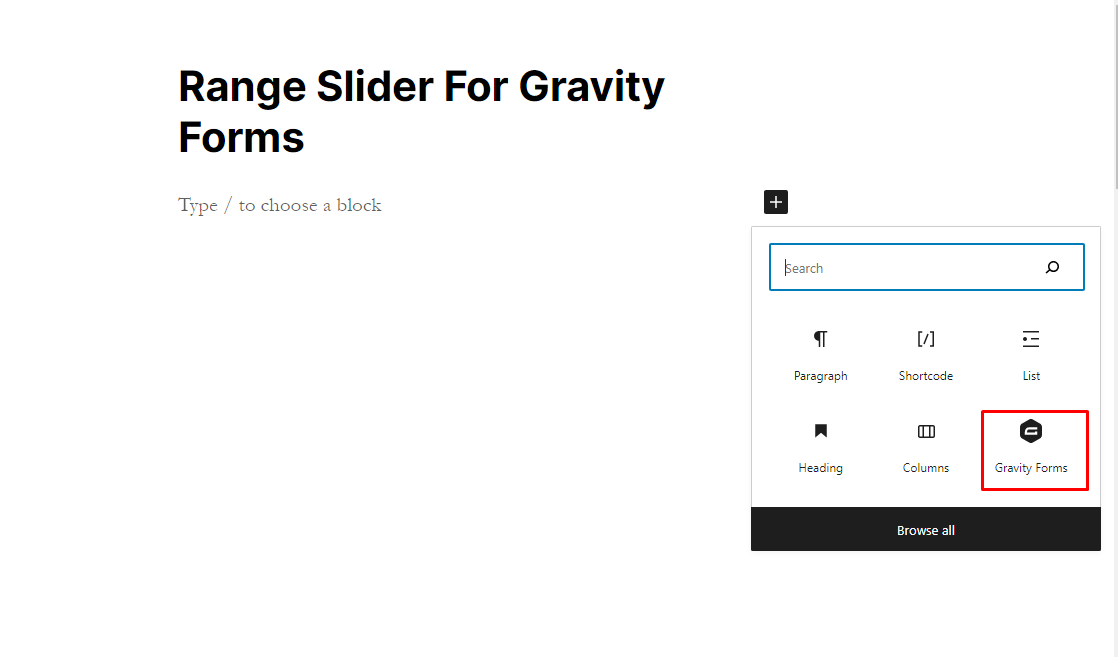
Adding a Gravity Form block in the WordPress block editor (Gutenberg). 
Selecting a form to display using the Gravity Forms block. 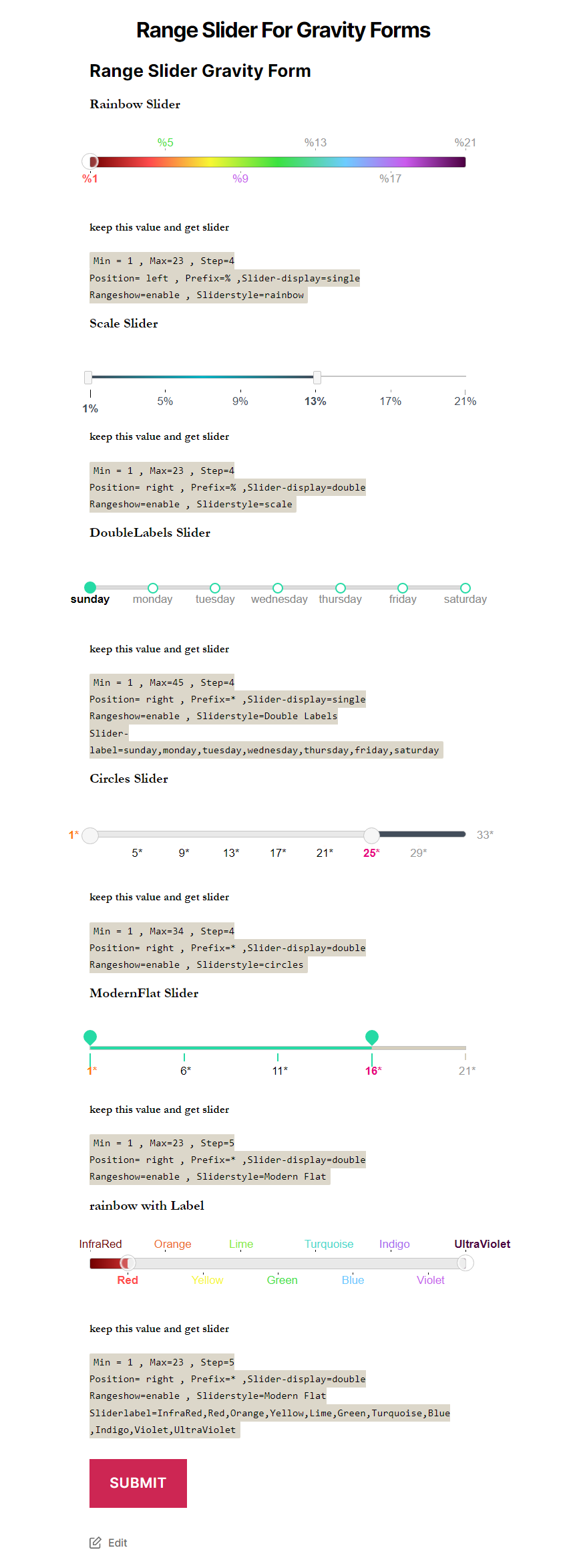
Frontend display — how the range slider appears to visitors on your site.
Asennus
Automatic Installation (Recommended)
- Log in to your WordPress dashboard.
- Navigate to Plugins > Add New.
- Search for Multiple Range Slider for Gravity Form.
- Click Install Now, then click Activate.
Manual Installation
- Download the plugin .zip file from the WordPress Plugin Directory.
- In your WordPress dashboard, go to Plugins > Add New > Upload Plugin.
- Select the downloaded .zip file and click Install Now, then Activate.
Getting Started After Activation
- Go to Forms in your WordPress dashboard and open or create a Gravity Form.
- In the Gravity Forms editor, locate the new range slider field types in the right-hand field list.
- Drag a slider field into your form layout.
- Configure min, max, step, prefix, style, and tooltip settings in the field settings panel.
- Save your form — the slider will appear on the front end immediately.
UKK
-
Does this plugin require Gravity Forms?
-
Yes. This plugin extends Gravity Forms by adding new slider field types. Gravity Forms must be installed and active. It is a premium plugin available at gravityforms.com.
-
What slider types are available in the free version?
-
Three slider types are included: a single edge slider (one handle, one value), a double edge slider (two handles for selecting a min-to-max range), and a custom label slider (text labels instead of numbers).
-
Can I set a custom minimum and maximum value?
-
Yes. Min and max values are configurable directly inside the Gravity Forms field settings panel for both single and double edge sliders.
-
Can I use a currency symbol like $ or € as a prefix?
-
Yes. You can add any prefix character to the displayed value. The Pro version also lets you position the prefix on either the left or right side.
-
Can I use text labels instead of numbers on the slider?
-
Yes. The custom label slider lets you define any text labels — such as days of the week, months, clothing sizes, or satisfaction levels — in place of numeric values.
-
How do I set the step size for the slider?
-
In the field settings panel inside the Gravity Forms editor, locate the step option and enter your desired increment (for example, 10, 25, or 100).
-
Are slider values saved with Gravity Forms entries?
-
Yes. Selected slider values are saved as part of the Gravity Forms entry, just like any standard field. They appear in the entries list, email notifications, and confirmation messages.
-
Where can I find documentation and support?
-
Visit the documentation for setup guides, or the support page for help.
Arvostelut


Avustajat & Kehittäjät
“Multiple Range Slider for Gravity Forms” perustuu avoimeen lähdekoodiin. Seuraavat henkilöt ovat osallistuneet tämän lisäosan kehittämiseen.
Avustajat
Käännä “Multiple Range Slider for Gravity Forms” omalle kielellesi.
Oletko kiinnostunut kehitystyöstä?
Browse the code, check out the SVN repository, or subscribe to the development log by RSS.
Muutosloki
1.3
- Tested compatibility with WordPress 6.9.
1.0
- Initial release — single edge slider, double edge slider, custom label slider, step control, prefix support, multiple styles, and tooltip position settings.