
Kuvaus
WFY24 Weather Widget lets you embed a free, fully-featured weather widget on any WordPress site — in any post, page, or sidebar — with a single shortcode, Gutenberg block, or built-in sidebar widget.
Zero-friction setup
On activation, a welcome wizard walks you through three clicks:
- Activate — we auto-register your site with wfy24.com using your admin email. No external signup. No copy/paste.
- Create Weather page — optionally publish a ”Weather” page with the widget ready to go.
- Add to sidebar — one-click inject a compact weather widget into your first sidebar.
Features
- Free version with a small ”Weather by WFY24” attribution link under each widget (disclosed and consented to during activation). No credit card, no hidden fees, no ads. Upgrade to Pro to remove the attribution
- Lightweight — 6.6 KB gzipped
- Real-time data — temperature, conditions, wind, humidity, 7-day forecast
- 50 languages — auto-detected from your site or set manually
- Auto location — GPS (with consent) or IP-based geolocation, or pin a specific city
- Light / Dark / Auto theme — matches your site automatically
- 5 layouts — Classic, Compact, Minimal, Badge, Forecast
- Shadow DOM isolation — zero CSS conflicts with your theme
- Zero dependencies — no jQuery, no React, no bloat
- Multi-source data — ICON-D2/EU/Global NWP + GFS fallback, with ML post-processing
Usage
Shortcode:
[wfy24_weather]
Override per instance:
[wfy24_weather city="paris-fr2988507" theme="dark" variant="forecast" lang="fr"]
Or use the WFY24 Weather Widget block in the Gutenberg editor for a visual interface.
Attribution
The free version of this plugin displays a small ”Weather by WFY24” link under each rendered widget. The onboarding wizard shows an explicit disclosure notice and asks for your consent before the ”Activate now (free)” button; clicking that button is your explicit permission to enable the link. To remove the attribution, a Pro version is available at wfy24.com/en/widgets/pro.
External service
This plugin connects to the WFY24 weather service at https://www.wfy24.com:
- Plugin activation: POSTs to
/api/widget/register-from-pluginwith the email you confirmed in the onboarding form (pre-filled from Settings General; editable inline before activation), site name, site domain, WordPress version, and plugin version, in order to automatically provision your free API key. No activation happens without your explicit click on the ”Activate now (free)” button. - City search (admin only, when typing in the Default City field): the plugin’s REST endpoint
/wp-json/wfy24/v1/citiesproxies your search query (e.g. ”athens”) to/api/places/searchserver-side. Your search query is sent along with a User-Agent identifying the plugin. Results (slug + label + country flag) are cached for 5 minutes per query. The admin’s IP is never exposed cross-origin because the request is server-to-server. - Widget rendering (client-side on visitor browsers): loads
widget.jsand queries/api/widget/data. The widget sends the API key, optional city slug, language/units/theme preferences, and adata-geolocationflag (off by default — visitor location is not detected unless the admin explicitly opts in via the ”Auto-detect visitor location” toggle). When the toggle is on AND the visitor grants permission, the visitor’s latitude/longitude is sent; when geolocation is denied, the visitor’s IP address is used for IP-based city detection (still gated by the toggle). No personal data is stored beyond standard anonymized request logs for rate limiting. - Pro upgrade flow (only if the user clicks ”Upgrade to Pro” in Settings): GETs
/api/widget/pro/statusand POSTs to/api/widget/pro/checkoutand/api/widget/pro/portalto provision a Stripe Checkout session and a Stripe Billing Portal session. No data is sent unless the admin clicks the relevant button.
Links:
- WFY24 Terms of Service: https://www.wfy24.com/en/terms
- WFY24 Privacy Policy: https://www.wfy24.com/en/privacy-policy
Multisite Support
The plugin is multisite-compatible. All settings (API key, defaults, page) are stored per-subsite using get_option()/add_option(), so each subsite operates independently.
- Network Activation does not contact wfy24.com. It only loads the plugin code on every subsite. No
admin_emailis sent, no API key is created, no automatic phone-home occurs. - Each subsite admin completes onboarding individually. When the admin opens the welcome wizard on a subsite and clicks ”Activate now (free)”, the plugin sends that subsite’s domain and
Settings General Email Addressto wfy24.com to obtain a domain-bound API key. The admin is shown a dynamic disclosure of the exact values that will be transmitted before clicking — no consent is collected on behalf of admins of other subsites. - New subsites added later remain inactive until their admin runs onboarding manually. The widget will not render on a subsite that has not been activated; no data leaves WordPress until an admin explicitly clicks Activate on that subsite.
- No centralized network admin panel exists in this version — each subsite has its own settings page. A network-level overview is on the roadmap.
- API keys are domain-bound. A key issued for
site-a.example.comwill not function onsite-b.example.com, which means subdomain and domain-mapped multisite installs work correctly out of the box (each subsite gets its own key for its own domain).
Kuvankaappaukset
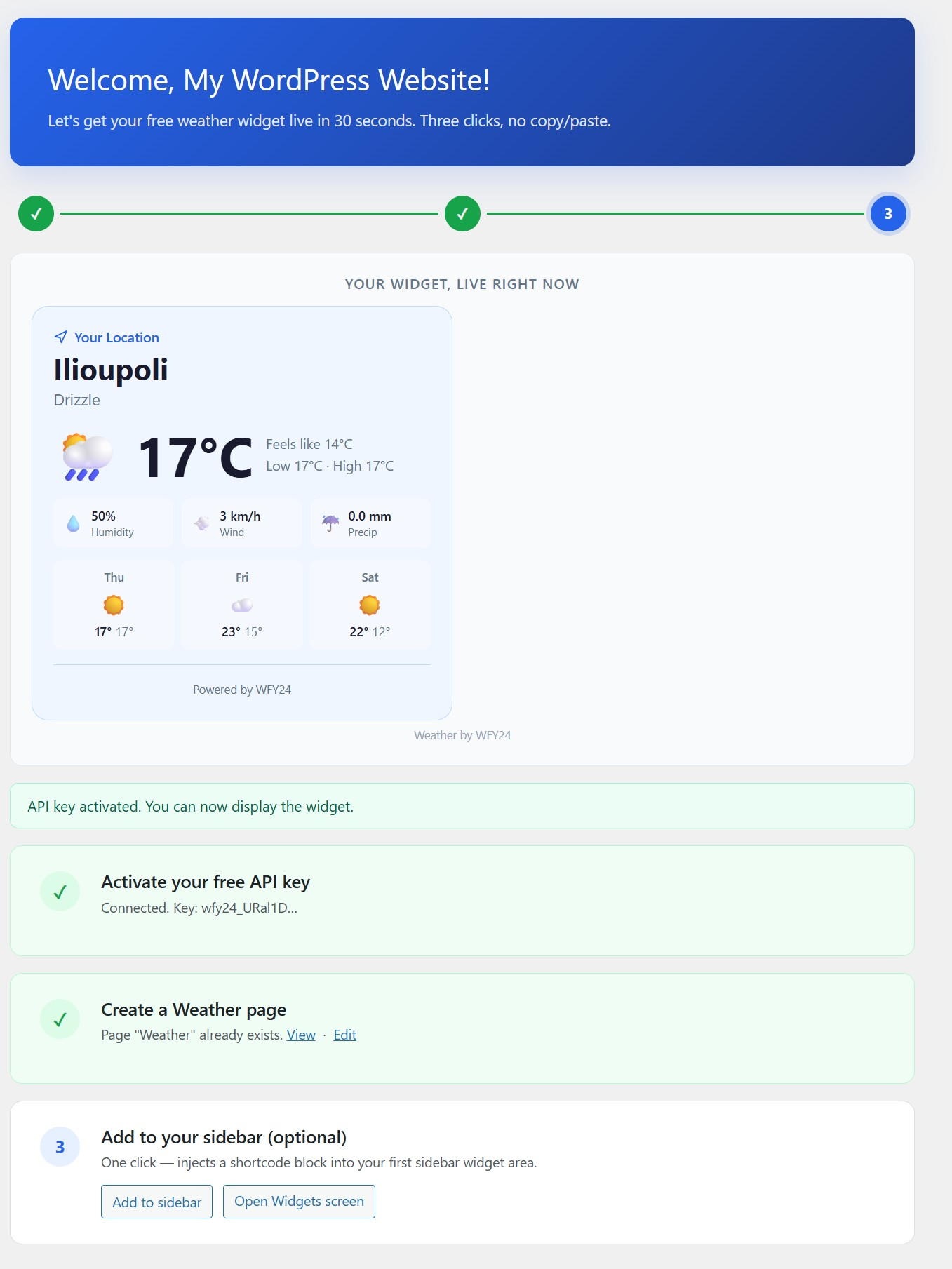
Welcome wizard after activation — live widget preview, key status, progress bar 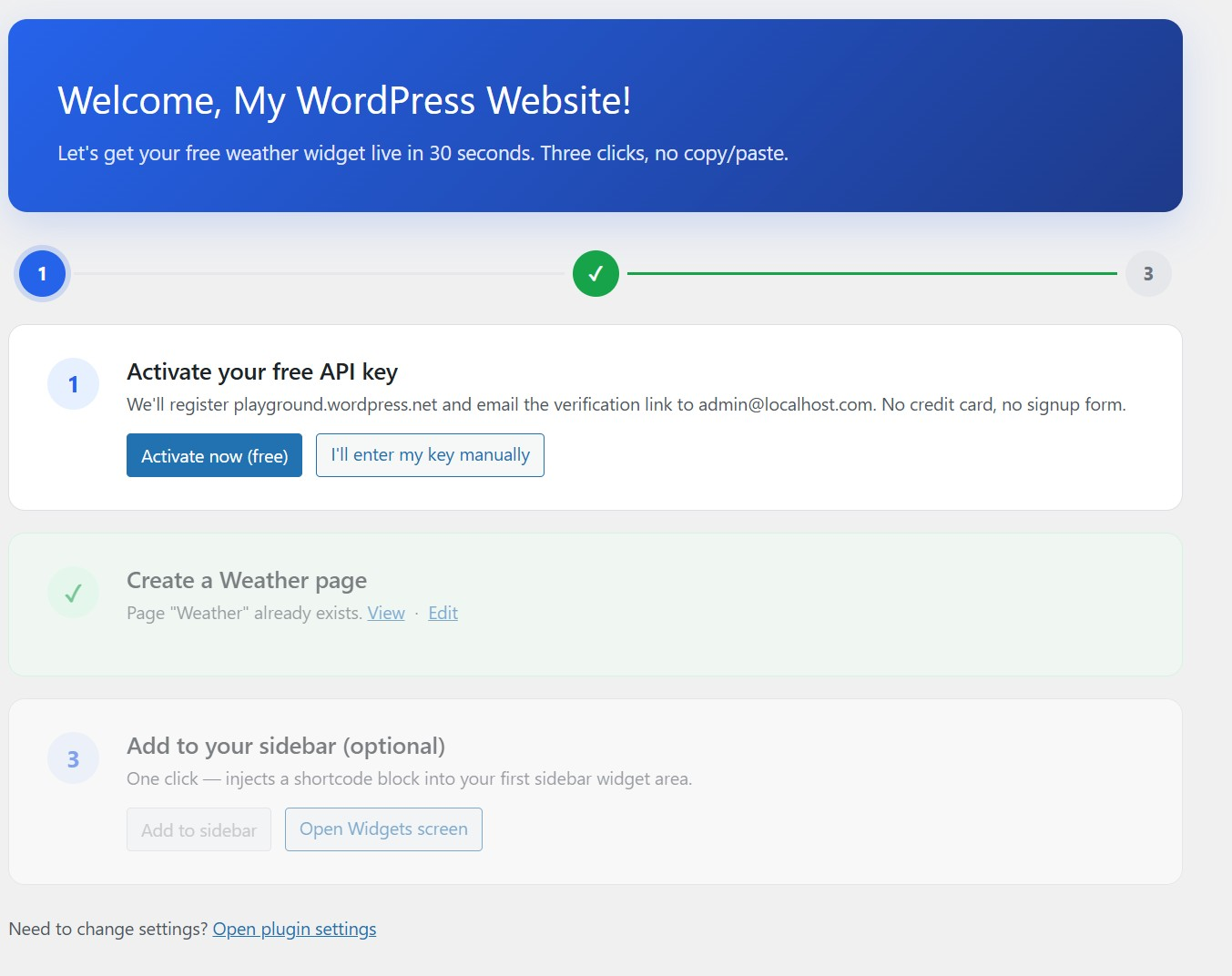
Welcome wizard on first open — three-step onboarding, zero copy/paste 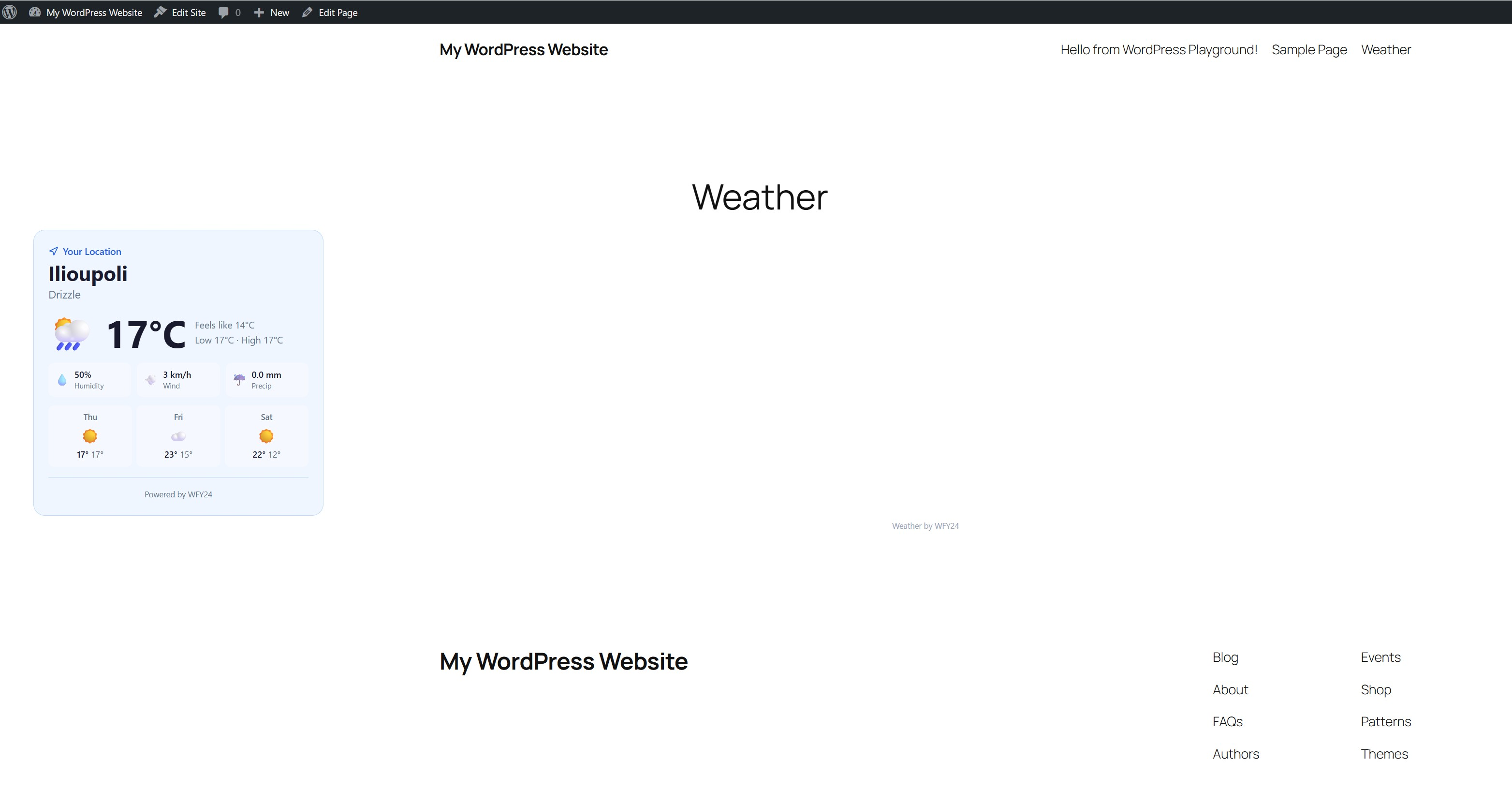
Classic widget layout rendered on a live WordPress page
Blocks
This plugin provides 1 block.
- WFY24 Weather Widget Embed a free, lightweight weather widget — real-time forecasts in 50 languages.
Asennus
- Upload the plugin to
/wp-content/plugins/wfy24-weather-widget/, or install via Plugins Add New. - Activate the plugin via the Plugins menu.
- Follow the welcome wizard that opens automatically. Three clicks: Activate, Create page, Add to sidebar. Done.
If you prefer manual setup:
- Go to Settings WFY24 Weather.
- Paste your API key (get one at wfy24.com/en/widgets).
- Add
[wfy24_weather]to any post, page, or widget area.
UKK
-
Is it really free?
-
Yes. No credit card, no trial, no ads in the widget. Fair-use rate limits apply (plenty for normal sites).
-
Do I need to create an account manually?
-
No. The plugin registers your site automatically on activation using your WordPress admin email. You can also enter a key manually if you already have one.
-
Can I revoke / change my key later?
-
Yes — visit wfy24.com/en/widgets to manage keys. Any changes you make there apply to this plugin immediately (keys are shared).
-
What data is sent to wfy24.com?
-
Minimal. See the ”External service” section above. The plugin only contacts wfy24.com on actions you explicitly trigger (activation click, widget rendering on visitor pages, Pro upgrade click). There is no background telemetry, no scheduled cron, and no analytics.
-
Can I customize the look?
-
The widget uses Shadow DOM for style isolation, so it won’t clash with your theme. Choose from 5 layouts (Classic, Compact, Minimal, Badge, Forecast) and 3 themes (Auto, Light, Dark).
-
What languages are supported?
-
50 languages. Set the
langattribute to any ISO 2-letter code. -
How do I find a city slug?
-
Go to wfy24.com, search for your city, and copy the slug from the URL (e.g.
paris-fr2988507). -
Does it work with caching plugins?
-
Yes. The widget loads client-side, so full-page cache has no impact on weather freshness.
-
Does it work with Gutenberg / block editor?
-
Yes — we ship a ”WFY24 Weather Widget” block under the Widgets category.
-
What data sources does WFY24 use?
-
WFY24 combines multiple NWP models (DWD ICON-D2, ICON-EU, ICON-Global, GFS fallback) with ML post-processing (XGBoost) and real observations from 19,000+ weather stations (METAR, SYNOP, CWOP, DWD, etc.).
-
Is there an attribution / ”powered by” link?
-
Yes. The free version of this plugin displays a small ”Weather by WFY24” link under each rendered widget. This is disclosed explicitly during activation — the onboarding wizard shows a notice asking you to agree before you click ”Activate now (free)”. Clicking ”Activate” is your explicit consent. The link is how we keep the service free for everyone.
-
Can I remove the ”Weather by WFY24” link?
-
Yes — by upgrading to Pro, which removes the link, increases the request rate limit, and unlocks additional features. The free version keeps the attribution as a fair trade for unlimited free data.
Arvostelut
There are no reviews for this plugin.
Avustajat & Kehittäjät
“WFY24 Weather Widget” perustuu avoimeen lähdekoodiin. Seuraavat henkilöt ovat osallistuneet tämän lisäosan kehittämiseen.
Avustajat
Käännä “WFY24 Weather Widget” omalle kielellesi.
Oletko kiinnostunut kehitystyöstä?
Browse the code, check out the SVN repository, or subscribe to the development log by RSS.
Muutosloki
1.5.6
- Language combobox: clicking the field now shows all 50 languages, not just the saved selection. Previously, focusing the field with ”English” already saved would self-match the filter and the dropdown would only show the single English entry — useless for switching language. Now the picker detects when the input value equals an existing language’s native or English name (i.e. the saved selection) and shows the full list so you can browse.
- Both city and language inputs now select-all on focus, so typing immediately replaces the saved value instead of appending to it.
- Removed the 12-item / 20-item slicing on the language list — the dropdown is scrollable, all 50 are now reachable.
1.5.5
- Fixed: city and language suggestion dropdowns never opened. The combobox stylesheet sets
display: noneas the default state for the suggestion list; the JavaScript was clearing the inline override (element.style.display = '') which fell back to that CSS default — so the dropdown was always hidden, even though the REST proxy was returning matches and no console errors were thrown. Now setsdisplay: blockexplicitly. Affects both the Default City picker and the Language combobox on the settings and onboarding screens.
1.5.4
- City picker UX matches the public wfy24.com search. The Default City dropdown now renders each result as a two-line item — country flag, bold place name, and a grey secondary line with region + country (e.g. ”Athens” / ”Attica, Greece”) — instead of a single concatenated label. The picker also forwards the admin’s locale to the upstream search so localized place names are returned.
- Keyboard navigation in the city picker. / to move through results, Enter to select, Escape to close — same shortcuts as the public site’s search dialog. Hovered and keyboard-active items share a single highlight state.
- Internal:
/wp-json/wfy24/v1/citiesnow returns structured fields (slug,name,country_code,country_name,flag,region) instead of a single pre-formattedlabel. Cache key includes the locale so per-language responses don’t collide.
1.5.3
- Onboarding overhaul. Step 1 is now a complete configuration form — admin email (editable inline; no need to leave the wizard for Settings General), default city (autocomplete search backed by wfy24.com places API), language (searchable combobox with all 50 supported languages shown in their native script and English name), theme, units, and a visitor-geolocation toggle — all set in one place before activation. Click Activate and the widget is live with your exact configuration.
- Visitor geolocation is now off by default. Previously the widget would call
navigator.geolocationwhenever no default city was set, which triggered a browser permission prompt on every visitor and silently broke when declined. Auto-detect is now an explicit opt-in checkbox; the default is to honour the admin-set city, which matches what 95%+ of sites actually want (e.g. a tourism site for Crete shouldn’t show a Swedish visitor’s local weather). - City picker. Type a city name and pick from results (slug + flag + country) instead of needing to know the wfy24.com slug format. Powered by a server-side proxy (
/wp-json/wfy24/v1/cities) so the admin’s IP is never exposed cross-origin. - Language combobox. All 50 supported languages now appear in a searchable dropdown with native + English names; type-ahead filters by either. The free-text 2-letter code input is gone.
- Stronger Pro pitch. The free-version notice now lists the full Pro feature set inline (no attribution, higher rate limits, priority support, custom CSS via theme tokens, historical data + analytics) instead of just ”removes the link.”
- Sticky settings access. A ”Open plugin settings” button is now pinned on the onboarding screen, and a ”Skip onboarding” link routes admins straight to Settings if they prefer to configure manually.
- CORP header on widget.js + /api/widget/. The hosted bundle now ships
Cross-Origin-Resource-Policy: cross-origin, which makes the widget work in cross-origin-isolated environments (e.g. playground.wordpress.net) that shipCross-Origin-Embedder-Policy: require-corp.
1.5.2
- Activation transparency. The onboarding wizard now displays an explicit, dynamic disclosure listing exactly what is sent to wfy24.com on click — the site domain, the administrator email currently configured in Settings General (rendered live so the admin sees their own email before consenting), the site name, the WordPress version, the plugin version, and the locale. No visitor data is collected. Admins who want to register with a different email are pointed to Settings General and asked to change it before clicking Activate.
- Documented multisite behaviour explicitly: per-subsite onboarding, no automatic phone-home on Network Activation, domain-bound API key per subsite. See the new ”Multisite Support” section.
1.5.1
- Plugin Check compliance — replaced two
wp_redirect()calls in the Pro flow (Stripe Checkout and Billing Portal) withwp_safe_redirect()plus a scopedallowed_redirect_hostsfilter that whitelistscheckout.stripe.com,billing.stripe.com, andpay.stripe.com. The redirect helper validates the target host against this list before issuing the redirect, falling back to a safe admin URL on mismatch. - Tightened the readme upgrade notice for 1.5.0 to fit the 300-character limit.
- Cleaned up readme: the ”External service” section and FAQ no longer reference the daily telemetry ping (removed in 1.4.0) — the plugin makes no scheduled outbound calls.
1.5.0
- WP.org compliance: replaced inline
<script>tags withwp_enqueue_script. All three call sites — the[wfy24_weather]shortcode, the admin-settings live preview, and the onboarding wizard preview — now register the widget bundle through WordPress’s enqueue API and emit a<div data-wfy24-widget …>placeholder where the widget should render. - The hosted widget bundle (widget.js) gained a third mount mode: it scans the DOM for
[data-wfy24-widget]elements and renders inside the placeholder you mark, so WordPress hosts can keep the script in the page footer (per directory guidelines) without breaking in-place rendering. The legacy inline-<script>pattern still works unchanged for non-WordPress integrations. - Added the WordPress 6.3
strategy => 'async'enqueue option.
1.4.0
- Removed the opt-in telemetry ping in line with the WordPress.org Plugin Directory guidelines on phoning home. The plugin no longer schedules a daily WP-Cron event and no longer sends domain / WordPress version / plugin version to wfy24.com. The
Telemetrycheckbox has been removed from the Settings page. Existing scheduled events are cleared on upgrade and on deactivation. - The Settings page no longer shows monthly request counts on the connection card (these were populated by the removed telemetry response). The card still shows the API key prefix.
- No change to the widget itself or to the Pro flow. All remaining external HTTP calls (one-shot site registration, Pro status, Stripe checkout/portal) are part of the service the plugin exposes and only run in response to an explicit user action.
1.2.0
- Pro tier. Added a Pro section to the plugin Settings page. One-click upgrade opens a Stripe Checkout session (€9/month); on successful payment the plugin is notified via webhook and the widget suppresses the ”Weather by WFY24” attribution link. Existing Pro users see their renewal date and a ”Manage subscription” button that opens the Stripe Billing Portal (update card, cancel, download invoices). Secure checkout via Stripe, cancel anytime.
- The shortcode now reads the Pro status from a plugin option (refreshed hourly via /api/widget/pro/status) and passes
data-attribution="0"or"1"to widget.js accordingly. - Added ”Upgrade to Pro” actions on the Settings page. No behavior change for free-tier users — the attribution remains required on free.
1.1.2
- Attribution compliance: the free version now displays an explicit disclosure notice in the onboarding wizard before activation explaining that the ”Weather by WFY24” link will appear under each widget. User consent is captured via the ”Activate now (free)” button click. Added FAQ entries explaining the attribution, the Pro upgrade path, and external service behavior. The widget script now respects a
data-attributionattribute (hardcoded to ”1” in the free plugin; Pro version sends ”0” to suppress the link).
1.1.1
- Plugin Check compliance: added translators comments, ordered placeholders (%1$s/%2$s), escaped block wrapper attributes, prefixed globals with wfy24_, removed load_plugin_textdomain (auto-loaded since WP 4.6), added nonce / enqueue justifications where required by the widget’s embed pattern.
1.1.0
- Zero-friction onboarding — welcome wizard auto-registers your site with wfy24.com on activation (no copy/paste)
- One-click Weather page creation — publish a ”Weather” page with the widget ready to go
- One-click sidebar integration — inject a compact widget into your first sidebar widget area
- Connection status — Settings page now shows key status and monthly request count
- Opt-in telemetry — daily anonymous ping so your wfy24.com dashboard shows active installs
- Improved readme disclosure for external services
1.0.0
- Initial release
- Shortcode
[wfy24_weather]with city, theme, lang, units, variant attributes - Gutenberg block under Widgets category
- Settings page for defaults (API key, city, theme, units, language, variant)
- Support for 50 languages and 5 layouts